public class Main {
  public static void main(String[] args) {
    // boolean型の変数を作る
    boolean bool1 = true;
    boolean bool2 = false;
    // 文字型の変数を作る
    char char1 = 'あ';
    // byte型の変数を作る
    byte byte1 = 100;
    // short型の変数を作る
    short short1 = 30000;
    // int型の変数を作る
    int int1 = 2000000000;
    // long型の変数を作る
    long long1 = 2000000000000000000L;
    // float型の変数を作る
    float float1 = 0.3F;
    // double型の変数を作る
    double double1 = 0.5;
    // 値を表示する
    System.out.println(bool1);
    System.out.println(bool2);
    System.out.println(char1);
    System.out.println(byte1);
    System.out.println(short1);
    System.out.println(int1);
    System.out.println(long1);
    System.out.println(float1);
    System.out.println(double1);
  }
}
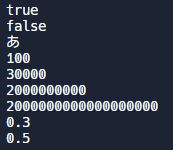
実行結果
public class Main {
  public static void main(String[] args) {
    // 文字列型の変数を作る
    String text1 = "Hello World!";
    String text2 = "It's me!";
    // 文字列型の変数を出力する
    System.out.println("1つ目:" + text1);
    System.out.println("2つ目:" + text2);
    // 文字列を連結する
    String text3 = text1 + text2;
    // 連結した文字列を出力する
    System.out.println("連結:" + text3);
  }
}
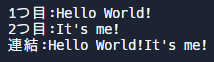
実行結果
public class Main {
  public static void main(String[] args) {
    // 整数型の変数を作る
    int x = 10;
    // xを文字列に変換する
    String str = String.valueOf(x);
    // strの型を表示する
    System.out.println(str.getClass().getName());
    // xの型を表示する
    System.out.println(((Object)x).getClass().getName());
    // 文字列型の変数を作る
    String str2 = "83";
    // str2を整数型に変換する
    int y = Integer.parseInt(str2);
    // yの値を表示する
    System.out.println(y);
    // yの値の2番の値を表示する
    System.out.println(y*2);
  }
}
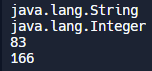
実行結果
import java.io.*;

public class Main {
  public static void main(String[] args) throws IOException{
    // キーボードから文字列を入力
    BufferedReader br = new BufferedReader(new InputStreamReader(System.in));
    String str = br.readLine();
    // 入力された文字列を表示
    System.out.println(str);
  }
}
実行例

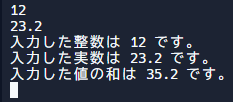
import java.io.*;

public class Main {
  public static void main(String[] args) throws IOException{
    // キーボードから整数を入力
    BufferedReader br = new BufferedReader(new InputStreamReader(System.in));
    String str = br.readLine();
    int num = Integer.parseInt(str);
    // キーボードから実数を入力
    str = br.readLine();
    double d = Double.parseDouble(str);
    // 入力した値を表示
    System.out.println("入力した整数は " + num + " です。");
    System.out.println("入力した実数は " + d + " です。");
    // 入力した値の和を表示
    System.out.println("入力した値の和は " + (num + d) + " です。");
  }
}
実行例
import java.io.*;

public class Main {
  public static void main(String[] args) throws IOException{
    // キーボードから整数を入力
    BufferedReader br = new BufferedReader(new InputStreamReader(System.in));
    String str = br.readLine();
    int num1 = Integer.parseInt(str);
    str = br.readLine();
    int num2 = Integer.parseInt(str);
    // 足し算の式を表示
    System.out.println(num1 + " + " + num2 + " = " + (num1 + num2));
    // 引き算の式を表示
    System.out.println(num1 + " - " + num2 + " = " + (num1 - num2));
    // 掛け算の式を表示
    System.out.println(num1 + " * " + num2 + " = " + (num1 * num2));
    // 割り算の式を表示
    System.out.println(num1 + " / " + num2 + " = " + (num1 / num2));
  }
}
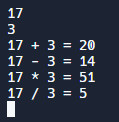
実行例